Is there no use of Soundslice to transcribe some of the playthroughs in the lessons? Sometimes it’s very difficult to see what Haydn is actually playing without stopping and pausing the video and trying to catch the notes being identified. Makes it difficult to try and apply some of the techniques without seeing them written out in context.
Hi @chris_w2 
Yes syncing full demonstrations is possible and relatively straightforward to implement.
I have tested this with a few jazz standard lessons below:
Please note that the notation only appears for the performance which corresponds to the transcription PDF in the “Downloads” section of the page.
Syncing Full Tutorials
We did experiment with synching Soundslice notation for entire tutorials, but it’s a huge job to notate everything played during the lesson and sync it in Soundslice.
This is partly due to my teaching style where I repeat phrases many times with slight variations, and also due to the nature of jazz ballads and ‘rubato’ playing.
I think the idea to show Soundslice notation for the main play-through / demonstration is a good middle ground.
Let me know what you think to the examples above and which lessons/courses you would like the Soundslice notation for first.
1 Like
That would be great Haydn. Only really practical on some of the more summary playthroughs as you say
I think it was some of the lessons on Misty Cocktail Improvisation where in particular I thought it might be useful… and just noticed in the Introduction to Jazz Modulations course, the Body & Soul full walkthrough has a summary playback that could easily be captured on Soundslice (would help show things like the ghost note technique better and your left hand rythym/rolling etc.)
…
Thanks for the suggestions Chris.
I’ll review the Misty Cocktail Piano lessons and downloads. I believe that most key performances from that course are notated in the PDF downloads with timestamps.
For that course, it could be a nice idea to combine all of the Soundslice notation performances into one video. That would be a 5 or 10 minute video of the demonstrations from the course, starting with the basic R-3-7 and gradually incorporating other arranging techniques.
…and yes we can also notate the Body & Soul lesson (from the jazz modulations beginner course).
I’ll post an update here when it’s all ready.
1 Like
A quick update…
In order to generate the Soundslice interactive notation, I need the ‘music XML files’ of the PDF downloads that we created. Music XML is essentially ‘note information’ that the Soundslice player can read.
I just reached out to our transcriber who created the course PDF files, as he didn’t send me the XML files for all of our transcription work over the past years - just some of them.
The Misty Cocktail Piano course is in the list of courses where I don’t have the XML files.
I’m pretty sure he will have the original music notation software files that he created, so he can generate the XML files for us.
I do have the XML files for these 3 courses:
-
Slow Blues For Beginners Course (January 2024)
-
Duo Vocal Accompaniment Course (April 2025)
-
Beginner 3-Note Voicings Courses (August 2025)
But not for these courses:
-
Gospel Masterclass Course (January 2021)
-
8 Bar Blues Course (April/May 2022)
-
“Misty" - Cocktail Piano Improv Course (November/December 2022)
-
“Georgia” - Bluesy Stride Course (February/March 2023)
-
“Nearness Of You" Stride Course (May 2023)
-
“Body & Soul” Stride Course (December 2023)
-
2 x Standalone Blues Transcriptions: “Jon Seminar” and “Slow Blues Performance" (February 2024)
-
Slow Blues In C Course (June 2025)
-
“Sentimental Mood” - Minor Harmony & Improv Course (December 2025)
The above courses will be a good fit for the Soundslice notation - so we will treat these courses as a priority for adding the interactive notation.
I’ll post more updates shortly.
2 Likes
Good news… I now have all of the music XML files for the above courses. Thankfully, our transcriber had everything saved.
Having reviewed some of the Misty Cocktail Piano course, the first 6 lessons contain a demonstration of each arranging style.
Lesson 7 was interesting because the PDF download included many demonstrations from the lesson. I synched the whole XML file with video which you can see here:
It does fall out of sync sometimes, but I think it works quite well overall.
Next I will add the interactive notation to lessons 2, 3, 4, 5, and 6. It might be nice to create a ‘video montage’ of those performances all in a singe video with the interactive notation. I will experiment with that.
The sync process is pretty straightforward and so I will hire someone to sync all of the notation for the courses that I listed in my message above.
Any feedback on the “Misty” B Section lesson above, just let me know!
1 Like
That’s brilliant! Many thanks Hayden.
(P.S. I’ve seen a print pdf option on Soundslice before, but couldn’t see it here)
My pleasure, Brian!
Sure… I will look for that setting.
FYI - any notation that is displayed in the Soundslice player will already be available in PDF format in the “Downloads” section of the page, for example:
and here is the relevant download:
- 7 - B Section Voicings Options.pdf (1.4 MB)
If you compare the notation in that PDF file and the notation in the Soundslice player, you will see that it’s identical, as the same file is uploaded to Soundslice in XML format.
The notation in the download section is timestamped with when that demonstration appears in the video and also the bar/measure number - please see the screenshot below:
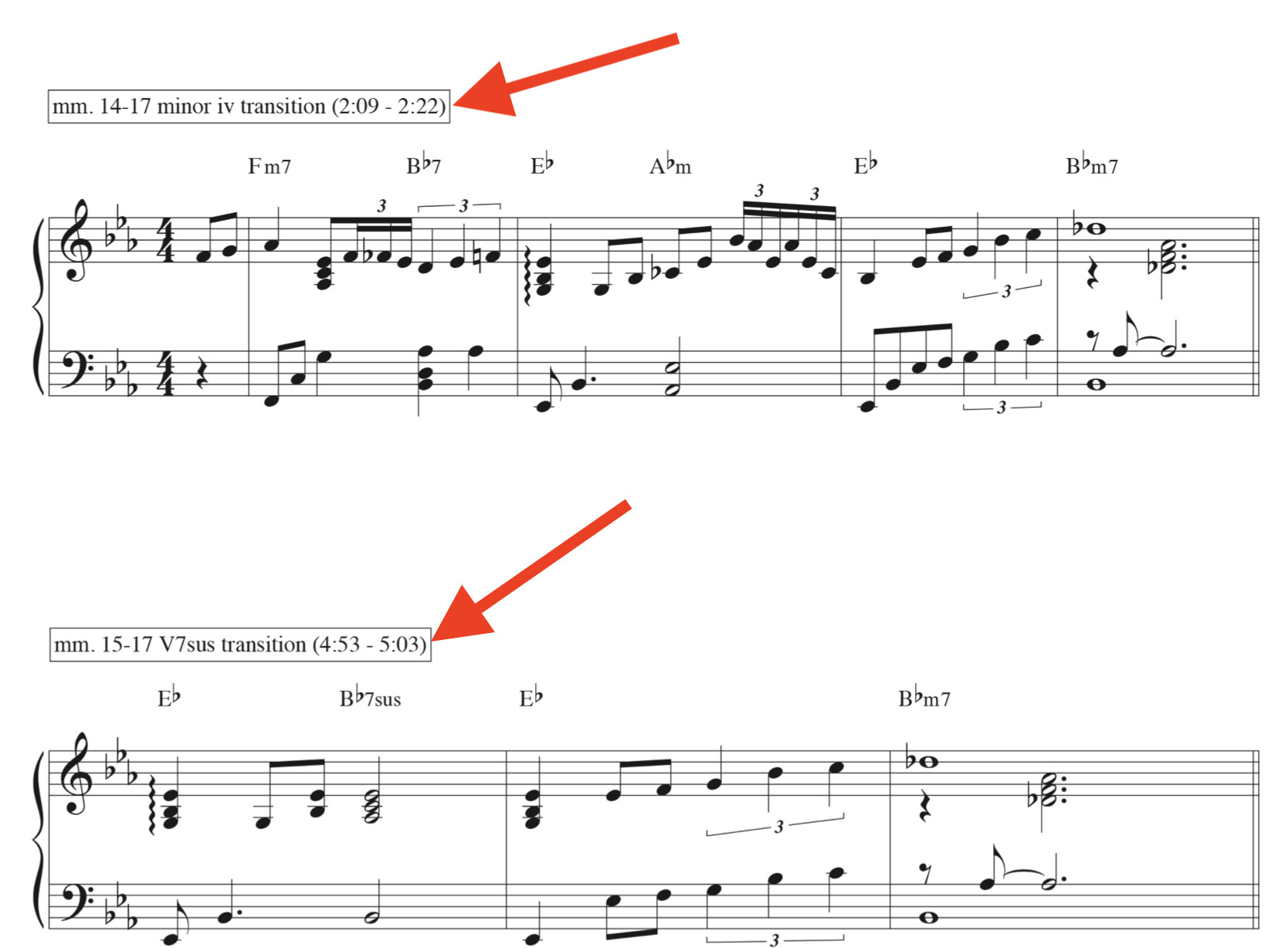
I imagine this will be a cleaner version of the PDF than downloading from Soundslice... but i will test that and report back.
Hayden
I was away from pianogroove for a little while and when I came back, the old player had been replaced with soundslice.
While this is a great upgrade, I am having trouble skipping forward and back as I used to using my iPad, which I prop on the piano without an attached keyboard.
I have 2 questions:
-
With the exception of playback speed, I can’t get any of the features to work without a keyboard. Is there a way to take advantage of soundslice without one?
-
Do you have an introductory to using the new soundslice interface? If not, it would be great for new users.
Many thanks.
Thx again Hayden - I’ve exhausted my trial week downloads, but look forward to upgrading in a couple days!
Hi Jeremy
Yes we switched to Soundslice player earlier this year.
I have recorded a video below for you which demonstrates and explains all of the Soundclice controls and functionality on iPad.
I’m using an iPad Mini and Safari browser in the video.
Yes, here is a summary of the main controls:
-
To skip back or forward, double tab the left or right side of the screen.
-
To play/pause the video, single tap in the centre of the screen.
-
To activate A/B Loop, press the Loop button and then drag the end markers as desired to set the loop start and end points.
-
Use the zoom in and out buttons on the right hand side of the A/B loop waveform which allows you to set the loop start and end points as granularly as 1/100th of a second.
-
Please note that when using an iPad, full screen is not compatible with Chrome browser, so I recommend to use Safari browser as you are using an iPad. Full screen does work with laptop/Macbook and Chrome browser.
Demonstration Video
Here is the full demo video for you with some added highlights so that you can see where I am tapping my iPad screen:
Yes I will add the above video to the new student orientation course, and also make one for desktop users too.
If anything is unclear in the video above please let me know.
My pleasure, Chris.
Over the weekend I will add the rest of the notation to the Cocktail Piano Course videos.
I’ll post an update here once finished.